Teaching Support Reps to Use the Guide, Not Memorize the Answer
A three-part Vyond video series built to help support reps use a troubleshooting guide during live calls, using a light game show frame to keep technically dense material watchable.
At a Glance
RoleInstructional Designer
ClientADP
AudienceClient Support Specialists
FormatSupport/upskilling course
FormatSelf-directed asynchronous
DurationAbout 20 minutes
Scope3-part Vyond video series + open-book assessment
ToolsVyond, Articulate Rise, Audacity
Why This Mattered
The guide existed. The reps were not using it. This project was about building fluency with a
job aid under live-call pressure, not teaching content from scratch.
Business Context
ADP's Client Support Specialists handled inbound calls from clients experiencing errors importing
payroll and employee data into Workforce Now. A detailed troubleshooting guide was available on
ADPworks, the internal resource platform, but reps were not consulting it reliably under live-call
pressure.
They attempted to resolve errors from memory, misidentified error types, gave incomplete
explanations, and generated callbacks that could have been avoided. The course therefore needed to
accomplish something specific: make the guide feel usable in the moment, not like a document to
study beforehand.
This module sat within a broader support curriculum in which learners could earn a badge toward an
overall Gold achievement. That broader pathway created room for targeted upskilling interventions,
but the instructional requirement for this course remained narrow and performance-based: improve
guide use during live troubleshooting rather than add more content exposure.
The final course included orientation to the guide's location on ADPworks, three scenario-based
videos, inline knowledge checks reinforcing each video's troubleshooting logic, and an open-book
final assessment requiring learners to use the guide to score 100%.
Role and Ownership
I owned the full instructional design for this project: needs analysis, solution design, script
writing, storyboard development, Vyond animation direction, knowledge check development, and
assessment design in Rise.
SMEs supplied the common error patterns that grounded the scenarios and checks. I originated the
Troubleshooting Trials game show concept as a strategic response to stakeholder interest
in gamification at a time when full gamification mechanics were not feasible to implement.
Stakeholder engagement extended through review and approval of all course materials before launch,
providing content validation for the troubleshooting logic learners were expected to apply.
Constraints and Design Requirements
Content was procedural and technically dense, creating high disengagement risk.
Stakeholders wanted a gamified learner experience, but infrastructure for full mechanics was not available.
No live training environment was available, so assessment had to support guide use rather than simulate system interaction.
Success depended on on-call performance, not post-training recall.
Validation needed to reinforce guide fluency under realistic conditions.
Design Decisions
1) Use a narrative frame instead of full gamification mechanics
Challenge
Stakeholders wanted gamification, but points systems, branching rewards, and leaderboards were not feasible within the project constraints.
Decision + Intended Effect
I proposed Troubleshooting Trials, a game show narrative frame with humor woven throughout. An animated host introduces each challenge while two support-rep characters work through it together. The format delivered the feel of gamification without requiring supporting infrastructure, kept stakeholders on board, and sustained attention without competing with the instructional content.
2) Model expert reasoning rather than only present answers
Challenge
Video is a passive medium, but the target skill was active guide fluency under live-call conditions.
Decision + Intended Effect
The rep characters narrate their reasoning aloud as they troubleshoot, modeling how an experienced support rep thinks through the guide in real time. This think-aloud approach draws on cognitive apprenticeship: learners observe expert process, not just expert output. The open-book assessment then requires them to replicate that process independently.
3) Keep lesson structure parallel across import types
Challenge
The three import types had overlapping but distinct error patterns, creating a risk of confusion if the lessons were presented inconsistently.
Decision + Intended Effect
I used one video per import type and kept the same sequence in each: host frames the scenario, reps troubleshoot together, and the logic is narrated step by step. That parallel structure reduces cognitive load across lessons so learners can focus on content differences rather than format changes.
4) Validate guide use rather than recall
Challenge
Validation needed to reinforce guide fluency, not content recall, but a full simulation was cut for time.
Decision + Intended Effect
The final Rise assessment explicitly permitted and required learners to use the ADPworks guides to answer correctly. Three attempts were allowed and 100% was required. That kept the assessment aligned with the core objective: using the guide accurately under pressure rather than memorizing its contents. Inline knowledge checks after each video provided lower-stakes retrieval practice before the final assessment.
5) Treat guide access as a prerequisite behavior
Challenge
Guide fluency assumes guide access, so scenario-based learning would fail if learners did not first know where the guide lived.
Decision + Intended Effect
The course opened with explicit instruction on locating the guide on ADPworks, and that location was reinforced again after the first video. Access was treated as a prerequisite behavior to establish, not as assumed prior knowledge.
Representative Examples
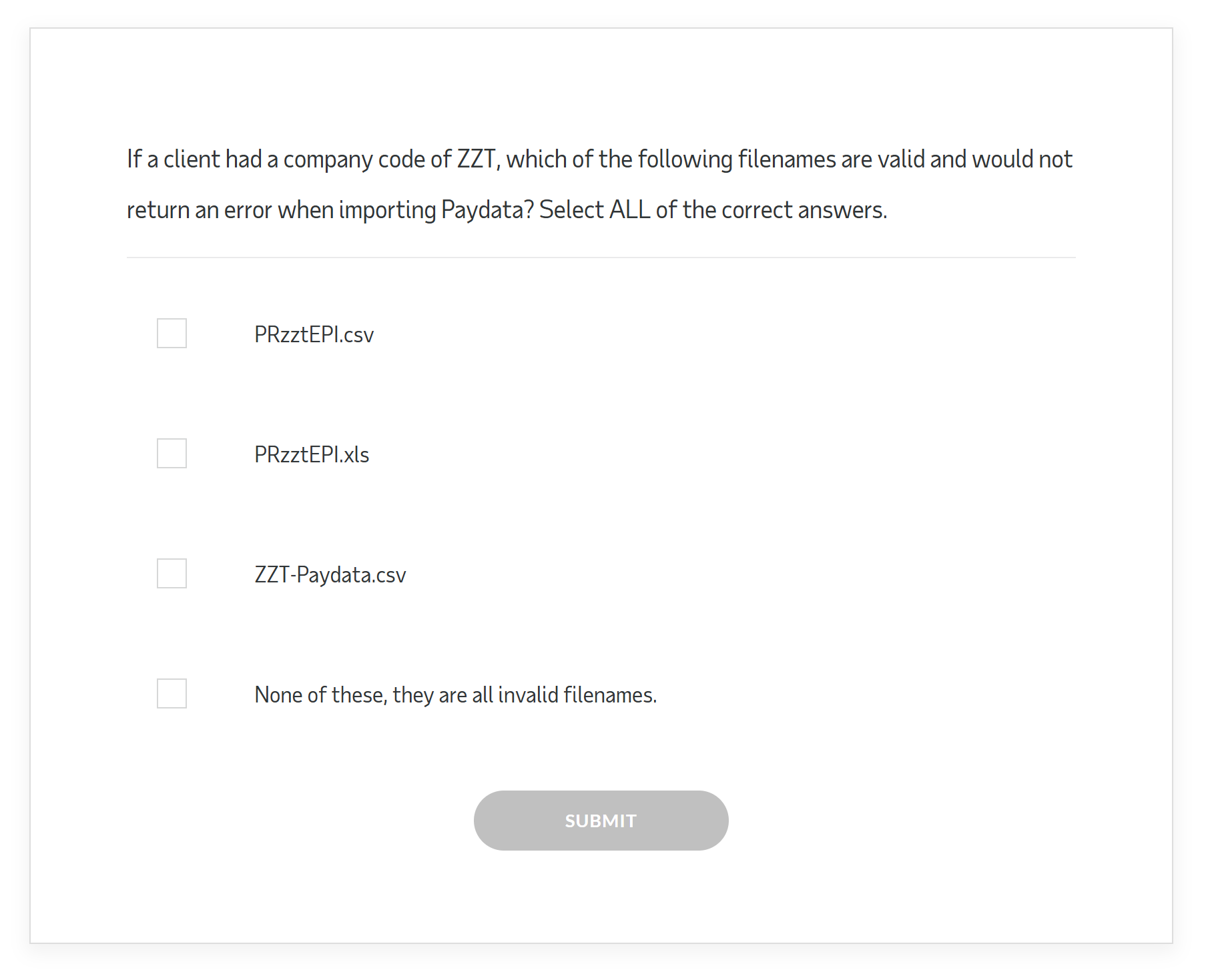
Selected production artifacts from the course, including one inline knowledge check.
Importing Paydata
Importing Employee and Time Off Data
Importing Validation Table Data
Inline Knowledge Check
Design Document
The following design specification was developed before production and guided decisions across
the course. It is included here to show the design process behind the deliverables above.
Needs Analysis
Performance Gap: Client Support Specialists were not using the available Troubleshooting Import Guide during live client calls. The guide existed and was accessible on ADPworks, but its length and navigational complexity made real-time reference feel impractical under call pressure. Reps defaulted to memory, leading to error misclassification, incomplete client explanations, and preventable callbacks.
Root Cause: This was a fluency gap, not a knowledge gap. Reps were not unfamiliar with the guide's existence; they lacked the speed and confidence to navigate it effectively while managing a live call. Training about import errors alone would not have solved the problem. The design applied adult learning principles, specifically the value of authentic context and immediate applicability, by grounding all scenarios in real call conditions that matched the environment where performance was expected.
Solution Rationale: A self-directed e-learning course combining modeled practice through video with applied practice through an open-book assessment was selected. The modeled practice needed to demonstrate expert guide navigation in realistic scenarios. The applied practice needed to require guide use under assessment conditions, not recall of memorized steps.
Audience Analysis
Role: Client Support Specialists supporting ADP Workforce Now clients
Context of performance: live inbound calls, time pressure, client present on the line
Prior knowledge: familiarity with the import process; limited fluency with the troubleshooting guide
Risk factor: errors and callbacks directly affect client satisfaction and rep performance metrics
Delivery constraint: self-directed; no instructor available during or after training
Learning Objectives
The following performance-based learning outcomes were developed to target observable on-call behavior, not content familiarity.
Locate the Troubleshooting Import Guide on ADPworks Remember
Navigate the guide in real time while supporting a live client call Apply
Identify the error type from an import error report Analyze
Select the correct resolution path from the guide for a given error Evaluate
Explain the error and resolution steps to a client in plain language Apply
Course Architecture
Component
Format
Purpose
Guide orientation
Instructional content
Establish prerequisite behavior: locating the guide on ADPworks
Lesson 1: Paydata
Vyond video
Model expert think-aloud for Paydata error types
Knowledge check 1
Inline questions
Retrieval practice on Lesson 1 error logic
Lesson 2: Employee Information
Vyond video
Model expert think-aloud for Employee Information error types
Knowledge check 2
Inline questions
Retrieval practice on Lesson 2 error logic
Lesson 3: Validation Table Data
Vyond video
Model expert think-aloud for Validation Table error types
Knowledge check 3
Inline questions
Retrieval practice on Lesson 3 error logic
Final assessment
Open-book Rise assessment
Applied guide use under assessment conditions; 100% required, 3 attempts
Rationale for parallel lesson structure: Each video follows an identical
narrative frame: host introduces the scenario, reps troubleshoot together, and the logic is
narrated aloud. Consistent structure reduces cognitive overhead when comparing error types
across lessons, allowing learners to focus on content differences rather than format
differences.
Assessment Strategy
Inline knowledge checks following each video served a formative function, surfacing
misunderstandings before learners reached the final assessment.
The final assessment required 100%, with three attempts permitted. Learners were explicitly
directed to use the ADPworks guides to complete it, so guide use was required, not merely
permitted.
Accessibility Considerations
The videos in this course did not include captions or transcripts. Captions are a WCAG 2.1
Level AA requirement for prerecorded audio content and would be a non-negotiable inclusion on
any equivalent project today.
Transcripts add a second layer of value for performance-support material because learners who
need to revisit troubleshooting steps after training benefit from a scannable text version of
the content. Both gaps reflect the standards applied at the time of production and are
documented here because acknowledging them accurately is part of sound instructional design
practice.
Measurement Plan
Note: Post-launch performance data was not available for this project. The
following represents the measurement framework I would apply to an equivalent project today.
Indicators this course was designed to move:
Guide adoption rate during live calls
First-call resolution rate on import-related calls
Client callback frequency attributable to import errors
Error classification accuracy in the assessment
A fully instrumented version would correlate assessment performance with post-training call
metrics such as first-call resolution, callback rate, and handle time on import-related calls.
On a similar project today, I would define those indicators in the brief before design begins
instead of treating measurement as a post-launch question.
Outcomes and Gaps
At launch, available measurement was limited to completion data. No post-training performance
metrics were collected for this project. The measurement framework I would apply today is detailed
in the Design Document above.
Reflection
This project reinforced that gamification is a design constraint, not a feature. The stakeholder
brief asked for engagement; the instructional challenge was making engagement serve the learning
goal rather than compete with it. The Troubleshooting Trials frame solved that problem by
giving learners a reason to stay in technically dense material long enough for the think-aloud
modeling to do its work, without requiring mechanics the project could not support. The result was
a learner-centered experience that kept engagement in service of the performance goal rather than
as an end in itself.
Looking at the course now, two gaps are clear: the videos lack captions and transcripts. Captions
are a WCAG requirement for prerecorded audio content, not a nice-to-have, and their absence would
be a blocker in any accessibility-conscious organization today. Transcripts extend the value
further by making video-based job aid content easier to reference after training. Both would be
non-negotiable inclusions on a comparable project now.
Want to talk shop?
If you're hiring, collaborating, or just curious, feel free to reach out.